Despite Notion being one of the most well-known personal knowledge management (PKM) tools out there, it’s far from perfect. It still lacks functionality that many users have been begging for over the years, and that competing apps already offer. This is one of the biggest reasons why many people keep looking for Notion alternatives.
![What is Notion? [A detailed guide for beginners] | Zapier](https://res.cloudinary.com/zapier-media/image/upload/f_auto/q_auto/v1707419888/Blog/what-is-notion/what-is-notion-image11_mxqioe.png)
One complaint I’ve always had about Notion is how it handles offline access. Given how often I work on the go or in places with spotty connections, the lack of a proper offline mode has always been a major, major drawback. After years of waiting, Notion finally launched an offline mode. But strangely enough, it doesn’t work the way you’d expect it to.
Notion’s offline mode works, but only if you enable it yourself
Since Notion was launched, it’s always had a cloud-first architecture. That’s finally changed now, as the company announced in a post on its website that offline mode is officially rolling out to users. This essentially means you no longer need an internet connection or a cellular connection to access, edit, or create pages in the app.
Though the offline mode does what any offline mode is supposed to do, you need to enable it manually for every document you’d like to view and work on when you don’t have access to the internet. Think of it like when you want to watch a YouTube video or Netflix episode offline — you have to download it first before you can play it without a connection. You can download individual Notion pages by hitting the horizontal three dots in the top-right corner and toggling on the switch next to Available offline.
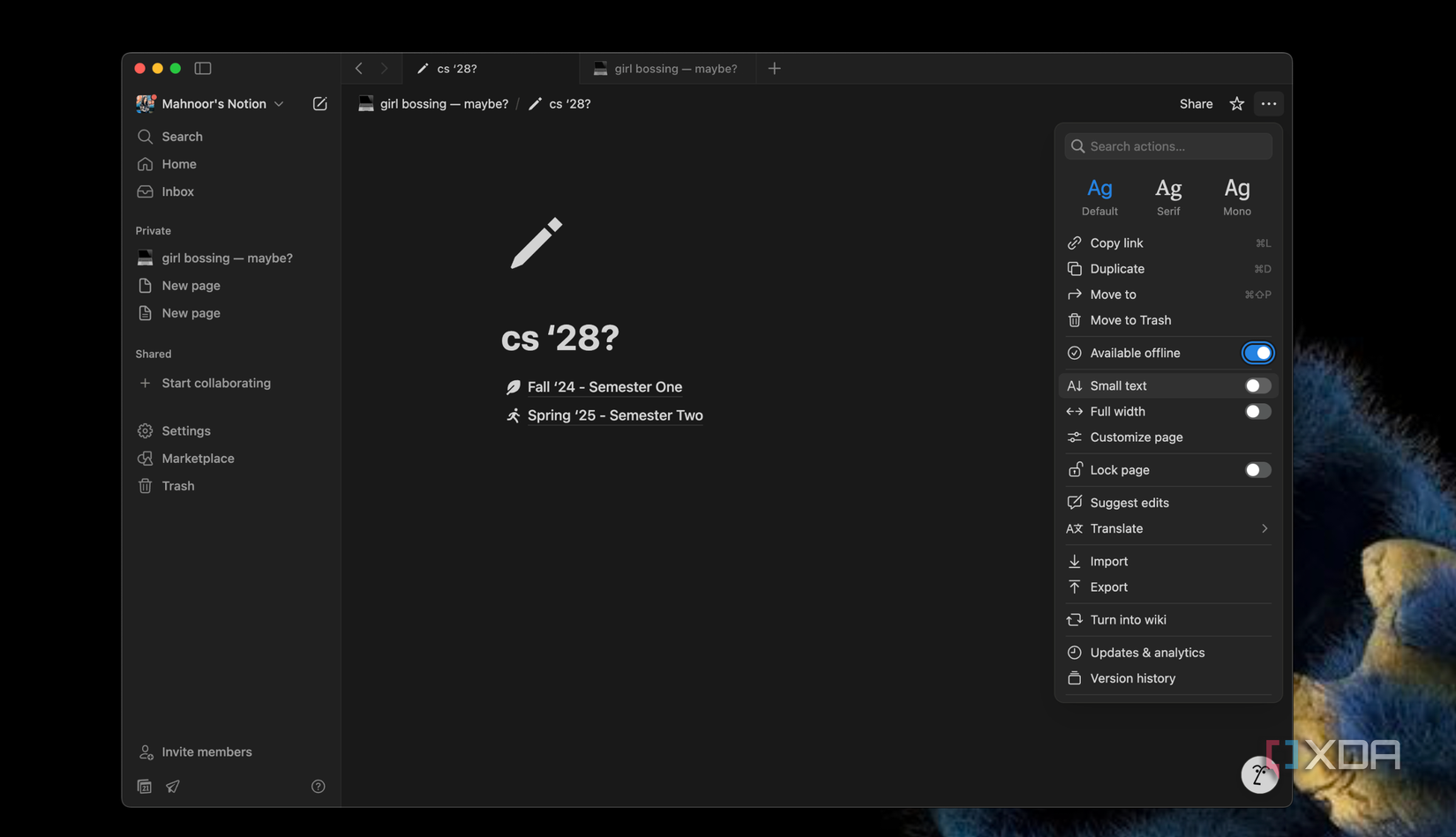
Once you enable it, a progress bar will appear as it downloads. When you’re accessing your downloaded pages offline, all the changes you make will save locally and automatically sync once your device connects to the internet. The issue of needing to manually download pages, however, is only a limitation on the free tier. If you’re subscribed to Notion’s Plus, Business, or Enterprise plan,
Notion can automatically download your recent and favorited pages. In case you’re on a paid tier and would like to disable automatic downloads for any reason, you can do so by heading to Notion’s Settings, selecting Offline from the sidebar on the left, and then toggling off the switch next to Automatic downloads.
On the same page, you can also find all the pages downloaded by you (or by Notion if automatic downloads are enabled). Though this limitation isn’t too big of a hassle, and it’s as easy as toggling on a switch, I can see myself forgetting to enable it for an important page, only to realize later when I’m offline and actually need it. Nonetheless, at least Notion finally has an offline mode. Something is better than nothing, after all!